





Help International Shoppers Understand Your Prices
EDD Currency Converter
Show Easy Digital Downloads prices in a currency your customers recognise. Let shoppers choose their preferred currency or detect it by location, while payments stay in your store’s base currency.
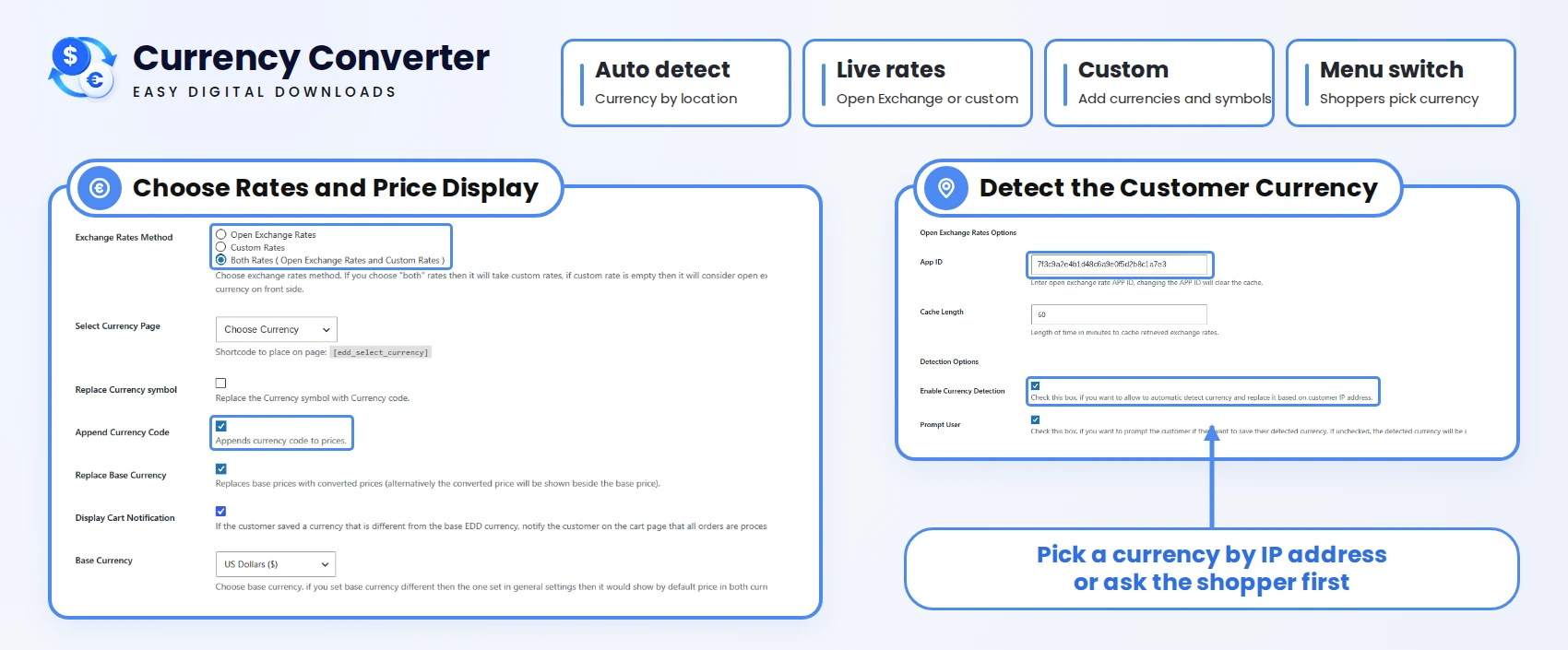


What You Can Do With EDD Currency Converter

Detect Currency From the Customer’s Location
Suggest a currency based on the visitor’s location. Help international customers understand your prices without first searching for the currency selector.

Let Shoppers Choose Their Preferred Currency
Give customers a currency dropdown through the [edd_select_currency] shortcode. Visitors can select the currency they find most useful when comparing your products.

Show the Selected Currency in Your Menu
Display the customer’s saved currency in the menu label. Keep their current selection visible as they browse your store.

Choose Automatic or Manual Exchange Rates
Retrieve exchange rates through Open Exchange Rates or enter your own rates manually. Choose the approach that fits how you manage prices.

Arrange Currencies With Drag and Drop
Change the order of currencies in the admin list. Place the options most relevant to your customers where they are easier to find.

Add Custom Currencies and Symbols
Add a custom currency with its own symbol. Configure the choices available to shoppers from your currency management settings.

Choose How Converted Prices Appear
Replace the displayed base price with the converted amount, or show both together. Give customers a familiar reference while retaining the original price when needed.

Explain the Payment Currency Before Checkout
Show a cart notice when the selected currency differs from your store’s base currency. Make it clear which currency will be used to process the order.

Add Currency Codes to Product Prices
Display a currency code alongside prices to clarify which currency shoppers are viewing. This is especially useful where several currencies share the same symbol.
Help customers compare your products without calculating exchange rates themselves.

Choose Your EDD Currency Converter Plan
Select a licence for your store or the websites you manage.
1 Website
Includes all plugin features, updates, and support throughout your subscription.
3 Website
Includes all plugin features, updates, and support throughout your subscription.
Unlimited Websites
Includes all plugin features, updates, and support throughout your subscription.
Currency Converter Features Included in Every Plan
Choose how customers view prices and how your store manages currency conversion.
- Location-Based Currency Detection
- Open Exchange Rates Integration
- Drag-and-Drop Currency Ordering
- Converted-Only or Dual Price Display
- Currency Selection Dropdown
- Saved Currency Menu Label
- Manual Exchange Rates
- Custom Currencies and Symbols
- Base-Currency Cart Notice
- Currency Codes Beside Prices
- Responsive Currency Selector
- Localisation Support

14-Day money-back guarantee. No questions asked!
Applies to all eligible products or services purchased through our platform. If you are not satisfied with your purchase for any reason, you may request a refund within 14 days from the date of purchase.
Discover what our customers have to say about their experience with our plugins. Read genuine reviews and see how our solutions help businesses simplify their workflow. 5.0/5 10 Ratings
Are you a customer? Samuel Cooper A practical extension for digital stores looking to improve the international shopping experience. Currency conversion can make product prices easier for customers to compare. Alex Morgan A currency conversion option can improve price clarity for customers shopping from different countries. It is a useful addition to an Easy Digital Downloads store targeting international buyers. Ryan Mitchell Showing prices in a customer's preferred currency can make browsing digital products more convenient. Currency conversion is a helpful feature for international storefronts. Ethan Parker This type of currency converter is useful for digital stores with customers across different regions. It provides another way to present pricing to suit international visitors. Oliver Bennett Currency conversion is a valuable feature for stores selling digital products worldwide. It gives customers a more familiar way to understand product prices. James Wilson Displaying prices in different currencies can make a digital store more approachable for international customers. It is a practical feature for improving the shopping experience. Michael Turner A currency converter gives store owners more flexibility when presenting prices to an international audience. It is a useful addition for digital businesses serving multiple markets. Daniel Brooks Currency conversion is a useful feature for digital stores serving customers in different countries. This plugin can help make product pricing easier for international visitors to understand. AmicusLabs Thanks, great plugin. Everything works as it should. Great support. Recommend)All Ratings & Reviews
Submit your review
Great Value
Reliable Functionality
Easy to Use
Flexibility
Feature Availability
Design Quality
Customizability
Customer Support
Feature Availability
More Screenshots
Technical Info


Frequently Asked Questions
All features included on every plan. Pick the license that fits your store.

No. Converted amounts help customers understand prices. Orders are still processed in the base currency configured in Easy Digital Downloads.
Yes. Customers can choose from the currencies you make available through the currency selector.
Yes. You can show the converted amount beside the base price or display the converted price on its own.
No. You can enter rates manually instead of retrieving them through Open Exchange Rates.
Yes. You can add custom currencies and define their symbols.
Enable the cart notification to explain that payment is processed in your store’s base currency when their selected display currency is different.
All license plans for our EDD Currency Converter plugin, including Starter, Business, and Agency, include 1 year of plugin updates and support, ensuring you have access to the latest features, improvements, and assistance when needed.