






What You Can Do With EDD Points and Rewards:

Reward Purchases With Points Worth Redeeming
Give customers points when they buy from your store. Those points can become discounts on later purchases, giving shoppers a practical reason to return.

Let Customers Buy Points
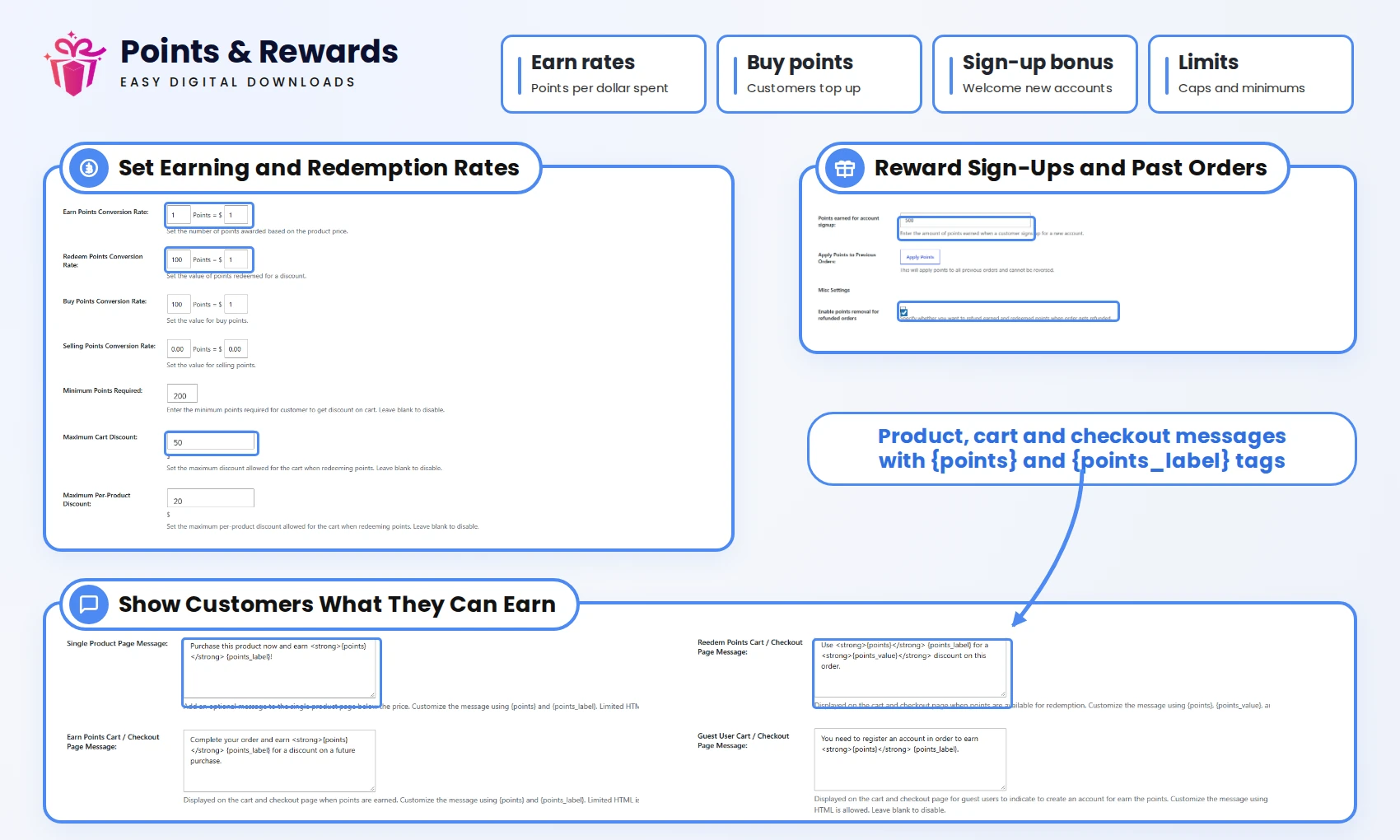
Create points products that signed-in customers can purchase. Set the conversion rate to determine how many points they receive for the amount spent.

Set How Customers Earn Points
Choose the points awarded for purchases across your store. Adjust the rules for individual products or categories when certain items need a different reward.

Turn Points Into Checkout Discounts
Let customers apply their available points towards an order. You decide how much those points are worth, so the discount follows your store’s redemption rules.

Award Points for Product Sales
Set a separate earning rate for sellers who sell products through your store. Reward their sales activity using the points conversion you choose.

Recognise Purchases Made Before Launch
Include existing customers when introducing your loyalty programme. Apply points to previous eligible orders that have not already received them.

Let Customers Check Their Points History
Give signed-in customers a place to review their balance and points activity. They can see their rewards without contacting your team for an update.

Show Available Rewards on Product Pages
Tell shoppers how many points a product purchase can earn. Display the message near the price so the reward is visible while they decide what to buy.

Welcome New Customers With Sign-Up Points
Award points when someone creates an account. Choose the welcome amount to give new customers a starting balance in your loyalty programme.

Adjust Customer Balances From WordPress
Update a customer’s points from the admin user list. Make corrections or manual adjustments, with the option to record the change in the points log.
Handle Points When Orders Are Refunded
Use the refund settings to manage points associated with refunded purchases. Keep earned rewards and redeemed balances aligned with the order’s outcome.

Set Limits on Points Discounts
Control the maximum discount customers can receive through points. Apply limits across the cart or use product and category settings for more specific control.

Choose a Minimum Redemption Balance
Set the number of points customers need before they can claim a discount. Display a message when their balance has not yet reached the required amount.

Reset Points for Selected Customers
Use the bulk action to reset points for selected users or all users. Manage resets from the WordPress user list rather than adjusting each balance separately.
Give every purchase a little more value with points customers can use on their next order.

Choose Your EDD Points and Rewards Plan
Select the website licence that fits your store or client projects.
1 Website
Updates, all features and support during the term of your subscription.
3 Website
Updates, all features and support during the term of your subscription.
Unlimited Websites
Updates, all features and support during the term of your subscription.
Points and Rewards Features Included in Every Plan
Build your loyalty programme around your products, customers, and discount rules.
- Purchase Reward Points
- Points Products for Purchase
- Seller Rewards
- Custom Earning Rates
- Custom Redemption Rates
- Product-Level Reward Settings
- Category-Level Reward Settings
- Points for Previous Orders
- Account Sign-Up Rewards
- Customer Balance and History
- Product Page Reward Messages
- Manual Balance Adjustments
- Refund-Related Points Adjustments
- Maximum Discount Limits
- Minimum Redemption Balance
- Bulk Points Reset

14-Day money-back guarantee. No questions asked!
Applies to all eligible products or services purchased through our platform. If you are not satisfied with your purchase for any reason, you may request a refund within 14 days from the date of purchase.
Discover what our customers have to say about their experience with our plugins. Read genuine reviews and see how our solutions help businesses simplify their workflow. 5.0/5 10 Ratings
Are you a customer? Samuel Cooper This plugin offers a useful way to add a loyalty program to a digital product business. Reward points can support repeat purchases and help create a more engaging customer experience. Alex Morgan A dedicated points and rewards extension can help bring loyalty features into an existing Easy Digital Downloads setup. It is a practical option for stores focused on customer retention. Ryan Mitchell A rewards program is a useful way to introduce loyalty incentives into a digital download store. It gives customers an additional reason to engage with the store. Ethan Parker A points-based rewards system offers flexibility in how a store encourages customer loyalty. It can complement other marketing strategies for digital products. Oliver Bennett Points and rewards are valuable features for a digital product store. A loyalty system can help businesses recognize returning customers and encourage ongoing engagement. James Wilson Adding a rewards system can make the shopping experience more engaging. It gives customers another reason to stay involved with a digital store after making a purchase. Michael Turner Reward points give store owners another way to structure customer loyalty incentives. This can be useful for businesses that want to encourage repeat purchases of digital products. Daniel Brooks A points and rewards system can be a useful way to encourage customers to return to a digital store. This plugin offers a practical approach to adding a loyalty program to Easy Digital Downloads. Webusermm Features and customer support is top. Very well written and clean code. Everything works. Highly recommended.All Ratings & Reviews
Submit your review
Great Value
Reliable Functionality
Easy to Use
Flexibility
Feature Availability
Design Quality
Customizability
Customer Support
Code Quality
More Screenshots
Technical Info


Frequently Asked Questions
All features included on every plan. Pick the license that fits your store.

Customers earn points through purchases and other enabled actions, such as registration. They can use their available points for discounts according to the redemption rate you set.
Yes. Product and category settings let you adjust the store-wide earning rules.
Yes. Create a points product and configure its purchase conversion rate. Customers must sign in before buying it.
Yes. You can apply points to previous eligible orders that have not already received them. Review this action carefully because it cannot be reversed.
Yes. Set maximum discount limits and a minimum points balance required for redemption.
Add a points-history page using the supplied shortcode so signed-in customers can check their balance and activity.
Yes. Administrators can adjust balances through the WordPress user list and optionally log the change.
All license plans for our EDD Points and Rewards plugin, including Starter, Business, and Agency, include 1 year of plugin updates and support, ensuring you have access to the latest features, improvements, and assistance when needed.